
Inventory and stock reports
Monitor product stock levels, inventory valuation, stock movements, expiry dates, adjustments, and gross margins.
Inventory and stock reports
Use the Inventory and stock reports catalog to audit stock quantities, monitor warehouse turnover, track expiring product batches, and evaluate product margins. Every report includes flexible date, category, and warehouse filters to give you complete visibility over physical assets.
When you use this
- Verify current stock on hand and total inventory valuation across retail outlets and central warehouses.
- Identify fast-moving goods versus stagnant inventory to prevent stockouts and reduce carrying costs.
- Track batch expiration dates to sell perishable goods before write-offs become necessary.
- Audit product-level gross profit margins and cost of goods sold across sales channels.
Screen layout
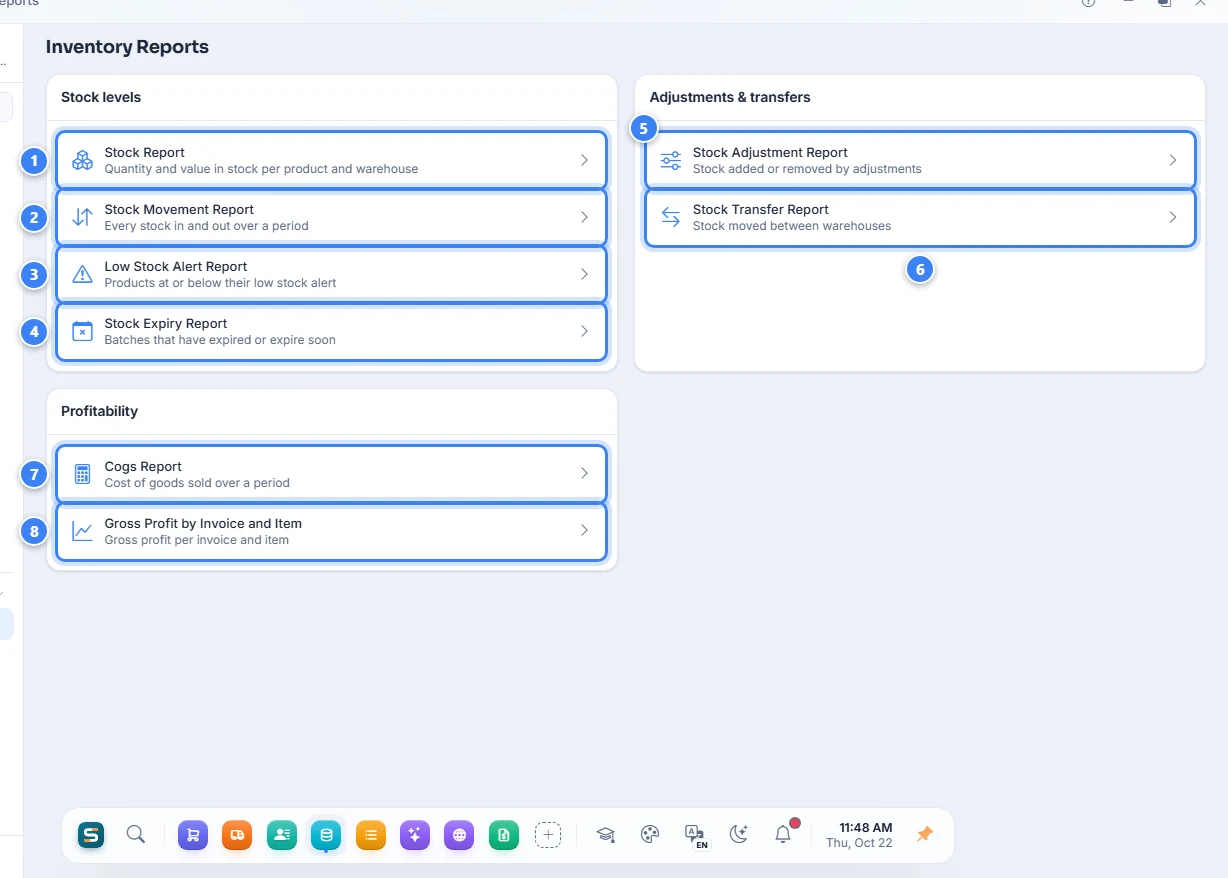 Inventory and stock reports catalog
- Stock report — total stock on hand, valuation, reorder status, and warehouse quantities.
- Stock movement report — product inflows, customer sales, adjustments, and current balances.
- Low stock alert report — products at or below reorder threshold requiring replenishment.
- Stock expiry report — perishable product batches approaching expiration dates.
- Stock adjustment report — manual inventory reconciliations, shrinkage, damaged goods, and write-offs.
- Stock transfer report — inter-branch stock dispatches and warehouse transfer receipts.
- Cost of goods sold report — direct product purchase costs and inventory margins.
- Gross profit by invoice item report — detailed sales invoice line item margins and profit percentages.
Step-by-step: Analyzing stock and warehouse reports
- Open Reports from your navigation bar and select Inventory reports.
- Click any report card to open the specialized data viewer for that analysis.
- Apply desired filter parameters such as warehouse location, product category, or date range.
- Click Filter to refresh the dataset with current inventory figures.
- Review the columns, product quantities, unit values, and summary totals.
- Click Export to generate an Excel spreadsheet or PDF document, or click Print for a physical copy.
- Click All reports in the header toolbar to return to the catalog.
Every field and control
Stock levels and movement
- Stock report (1): Provides a comprehensive summary of all catalog products. Displays product names, SKU codes, brand names, category groupings, current quantities on hand, average unit costs, and total valuation.
- Stock movement report (2): Records an audit trail of every inventory change. Shows opening balances, purchase receipts, customer deliveries, transfer dispatches, manual adjustments, and closing stock.
- Low stock alert report (3): Filters specifically for products whose available quantity has fallen below their configured reorder point. Helps your purchasing team generate replenishment purchase orders quickly.
- Stock expiry report (4): Lists batch-tracked inventory with upcoming expiration dates. Groups products by days remaining so you can discount or prioritize dispatch before expiration.
Adjustments and transfers
- Stock adjustment report (5): Details manual stock corrections resulting from routine physical counts, shrinkage, breakage, or inventory reconciliation. Shows adjusted quantities, cost impacts, and explanation notes.
- Stock transfer report (6): Tracks the dispatch and receipt of products moving between branches and warehouses. Confirms intransit quantities and validates delivery arrival.
Profitability and costs
- Cost of goods sold report (7): Calculates the direct purchase cost of inventory sold during the selected timeframe. Helps management determine accurate gross operating profit across product categories.
- Gross profit by invoice item report (8): Analyzes line-by-line invoice sales, comparing selling price against purchase cost to display realized profit margins in currency and percentage.
Report viewer filters and controls
- Warehouse: Select a specific storage location or view aggregated stock totals across all branches.
- Category / Brand: Filter inventory tables by product family or manufacturer.
- Date range: Restrict movement, adjustment, and profitability calculations to specific calendar windows.
- Export: Generates spreadsheet files (.xlsx, .csv) or formatted documents (.pdf).
- Print: Prepares a clean print preview tailored for standard paper formats.
Common questions
How does the system calculate total inventory valuation?
The Stock report computes valuation by multiplying each product's remaining on-hand quantity by its weighted average purchase cost.
Can I schedule automatic email alerts for low stock products?
Yes. You can configure notification rules in system settings to receive scheduled summaries whenever products enter the Low stock alert report.
Does the Stock movement report track damaged product removals?
Yes. Whenever a team member completes a stock adjustment with a damage reason, the deducted quantity appears clearly in the Stock movement report.
Related pages
- Products and inventory — maintain catalog items, barcodes, and standard pricing.
- Stock receipts and transfers — record warehouse transfers, opening stock, and adjustments.
- Sales and purchase reports — inspect customer invoice totals, dues, and supplier bill registers.