
Unit list
Browse, search, filter, and manage measurement units used for product quantities, sales, and inventory tracking.
Unit list
Use this screen to view and manage every unit of measurement configured for your business inventory. Units define how products are counted, packaged, weighed, and sold—such as pieces, kilograms, liters, boxes, or meters.
Unit of measurement defines the standard quantity in which an item is stocked or sold, such as
Pcs(Pieces),Kg(Kilograms), orBox.
When you use this
- You introduce products sold by weight, length, or volume and need to set up units like grams, liters, or meters.
- You want to verify active units before assigning them to newly created items.
- You need to search for a specific unit to update its naming or operational status.
- You export your measurement units list to an Excel spreadsheet for catalog audits.
Before you start
- You need access to this screen. If you do not see it, ask your administrator.
- Know the standard abbreviations and naming conventions for your trade.
Open the unit list
Click the Units menu item on the Product application sidebar or desktop dock. The unit list table opens.
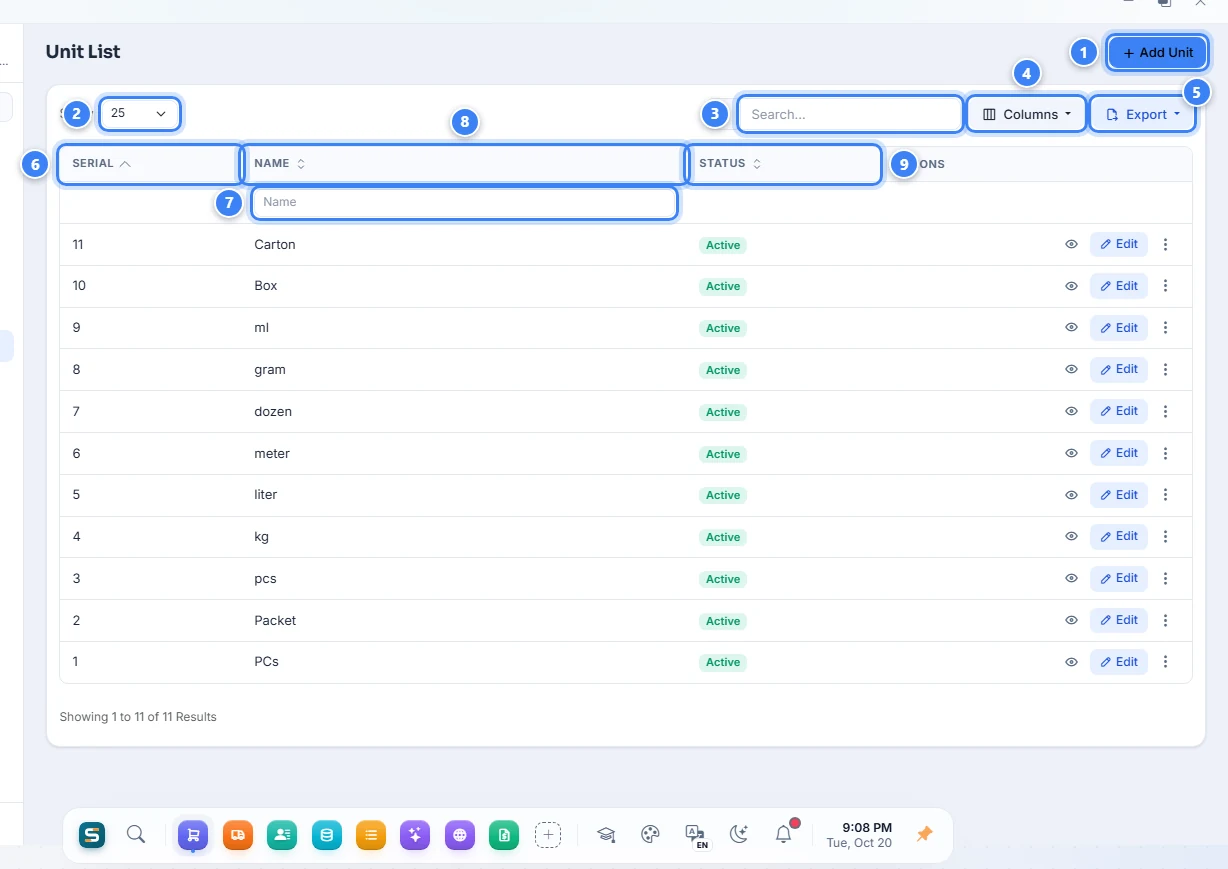 The unit list
- Add Unit — opens the window to register a new measurement unit.
- Rows per page — selects how many unit rows to display per page.
- Search — search units by name.
- Columns — toggles datatable column visibility.
- Export — exports unit list to Excel or PDF.
- Serial column — displays serial sequence number.
- Name filter — inline filter for unit name.
- Name column — displays measurement unit name.
- Status column — indicates active or inactive unit status.
Every field on the unit list
| Control | What it is for | Example | Required? | Default | What happens when changed | What depends on it |
|---|---|---|---|---|---|---|
| Add Unit | Button opening the unit creation modal window. | Click button | Optional | — | Opens the Add Unit modal. | Allows creating new measurement units. |
| Rows per page | Dropdown selecting visible table rows. | 25 |
Optional | 10 |
Changes table page length. | Adjusts pagination numbers. |
| Search | Global search across unit names. | Piece |
Optional | Blank | Filters table rows matching query. | Narrows visible measurement units. |
| Columns | Menu to toggle visibility of table columns. | Toggle checkbox | Optional | All visible | Shows or hides selected columns. | Customizes table view. |
| Export | Downloads unit directory into files. | Click button | Optional | — | Generates Excel or PDF download. | Unit directory reporting. |
| Serial column | Displays sequence row number. | 1 |
Display | — | Shows row index in the catalog. | Sequential display ordering. |
| Name filter | Inline column filter for unit name. | Kilogram |
Optional | Blank | Filters table rows by name substring. | Inline column filtering. |
| Name column | Table column displaying measurement unit name. | Pcs |
Display | — | Clicking sorts table alphabetically. | Sort display order. |
| Status column | Table column displaying active or inactive state. | Active |
Display | — | Shows green or grey status badge. | Unit availability on product forms. |
Example
Nasir operates a grocery supermarket:
- He opens Units from the Product dock.
- He types
Kgin the Search box to see if kilograms are already configured. - The table displays the row for Kilograms with an Active status.
- Having confirmed the unit exists, he proceeds to register newly arrived fruits.
Common questions
What happens if I set a unit to Inactive? Existing products configured with that unit continue to retain their history and past transaction records. However, cashiers and catalog staff cannot choose an inactive unit for new product listings.
Can I delete a unit that is used by products? No. To prevent inventory calculation errors and sales discrepancies, delete actions are blocked while active products reference the unit.
How do units appear on receipts and POS? The unit name appears alongside item quantities on touch-screen registers, purchase orders, printed receipts, and sales invoices.
Related pages
- Add or change a unit — Create or update measurement unit details.
- Product list — View products and filter by unit.
- Add or change a product — Assign units to products on the Basic tab.