
Financial reports
Comprehensive financial statements and ledger reports including balance sheet, profit and loss, trial balance, and general ledger.
Financial reports
The Financial reports screen gives you access to complete accounting statements and transaction ledgers. You can inspect cash books, tax statements, receivable aging, and audit trails.
Every report in Sylloo computes figures in real time from posted transactions. You can filter data by date range or branch outlet and export reports to PDF, Excel, or CSV.
When you use this
- Preparing statutory financial statements like the Balance Sheet, Profit & Loss, and Trial Balance.
- Examining itemized debit and credit activity for specific accounts in the General Ledger.
- Reviewing daily cash collections and disbursements in the Cash Book or Day Book.
- Inspecting accounts receivable and payable aging reports to collect customer dues and schedule payments.
Before you start
- Ensure your user account has permission to view accounting reports.
- Confirm that transactions up to your chosen reporting date have been posted.
- Ensure bank reconciliations are current so cash balances match actual bank positions.
Open the financial reports catalog
- Go to Accounting in the left navigation sidebar.
- Select Reports.
- The catalog opens displaying all available accounting report categories.
Generate and export a report
- Click any report title in the catalog (such as Balance Sheet or General Ledger).
- The report viewer opens with report filters. Select your desired Date range and Outlet.
- Click the refresh button to generate figures.
- Use the top toolbar to print or export data to an Excel file or PDF document.
Every field on this screen
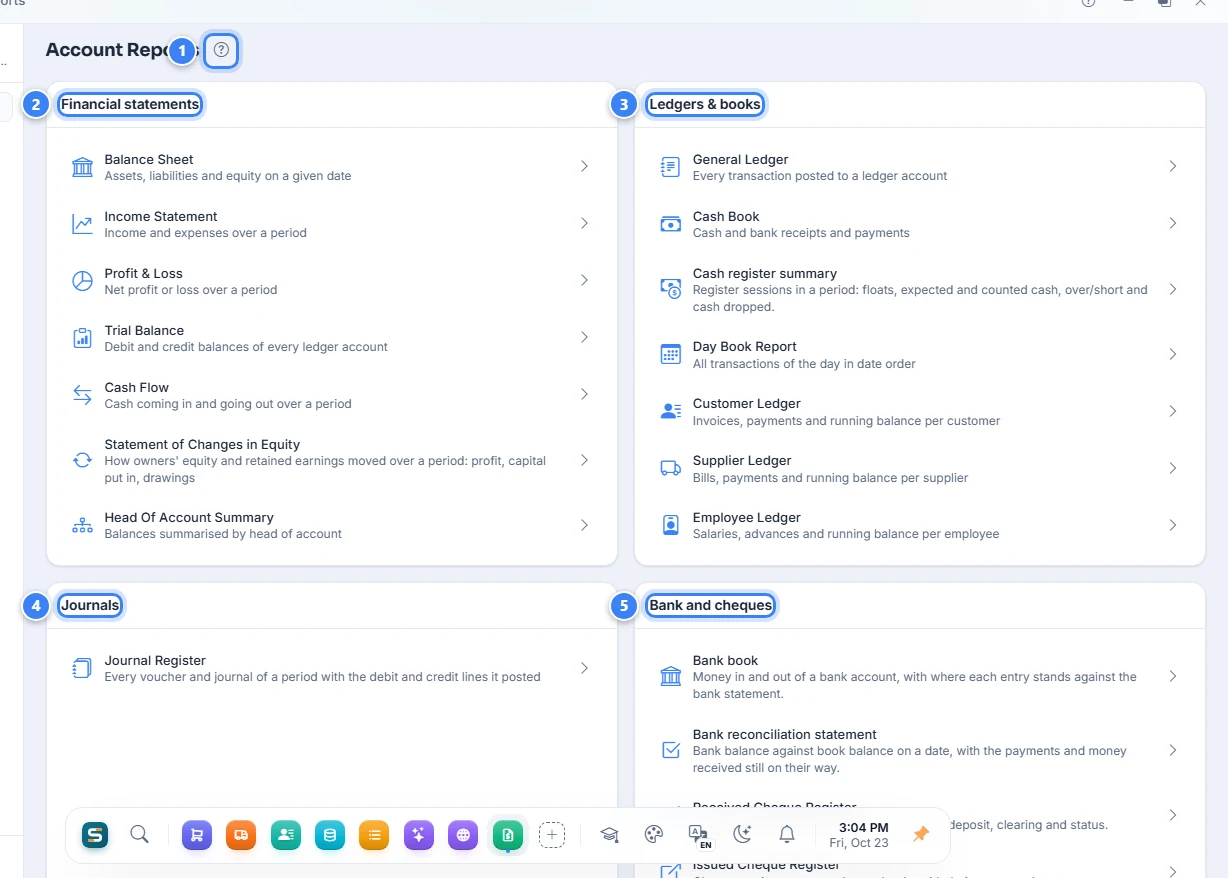 Financial reports catalog
- Help (?) — Opens this Help Center guide in a slide-out side panel.
- Financial statements — Primary statutory accounting statements including Balance Sheet, Income Statement, Profit & Loss, and Trial Balance.
- Ledgers & books — Itemized transaction records including General Ledger, Cash Book, Customer Ledger, and Supplier Ledger.
- Journals — Chronological registers of accounting vouchers and journal transactions.
- Bank and cheques — Reports for bank books, reconciliation statements, and cheque registers.
- Receivables & payables — Aging analyses and outstanding balances for customers and suppliers.
- Tax — Tax liability, withholding tax, and statutory VAT summary reports.
Accounting report categories
The catalog groups reports into six primary categories.
- Financial statements: Core statutory statements including Balance Sheet, Income Statement, Profit & Loss, Trial Balance, and Cash Flow statement.
- Ledgers & books: Detailed account registers including General Ledger, Cash Book, Cash Register Summary, Day Book, and individual sub-ledgers.
- Journals: Daily transaction lists and journal registers showing debit and credit entries.
- Bank and cheques: Records of commercial bank transactions, reconciliation statements, and cheque registers.
- Receivables & payables: Customer and supplier balances, aged debt analyses, and payment schedules.
- Tax: Withholding tax certificates, input and output VAT statements, and tax summary registers.
Report viewer controls
The built-in viewer lets you customize output:
- Date range: Filters figures between chosen start and end dates or fiscal years.
- Outlet: Restricts data to a specific branch or consolidates figures across your company.
- Export & Print: Generates high-resolution printable reports, PDF documents, or spreadsheet data.
Common questions
How often are financial reports updated?
Reports compute figures in real time from all posted transactions. Any new voucher, invoice, or receipt entered is instantly reflected upon generating the report.
Can I run comparative statements between two periods?
Yes. Reports such as the Profit & Loss and Balance Sheet support comparative period filters to evaluate monthly or annual growth side by side.
Related pages
- Voucher list — Record single-entry payments, receipts, and bank fee adjustments.
- Bank statements and reconciliation — Reconcile bank balances before generating balance sheets.
- Period lock and year close — Close financial years and review annual retained earnings.