
Customer order details
View individual order specifications, track delivery timelines, inspect financial statements, and download official invoices.
Customer order details
The Customer order details screen presents complete transaction records for an individual order. Customers can inspect product quantities, verify taxes, track real-time delivery progress along the fulfillment timeline, and download official invoices.
When you use this
- Verify individual product quantities, unit selling prices, and line extensions for a past purchase.
- Track real-time courier fulfillment progress from order placement to final delivery.
- Download a formal sales invoice or delivery note for business records.
- Check the remaining balance due on an unpaid invoice and proceed directly to payment.
Screen layout
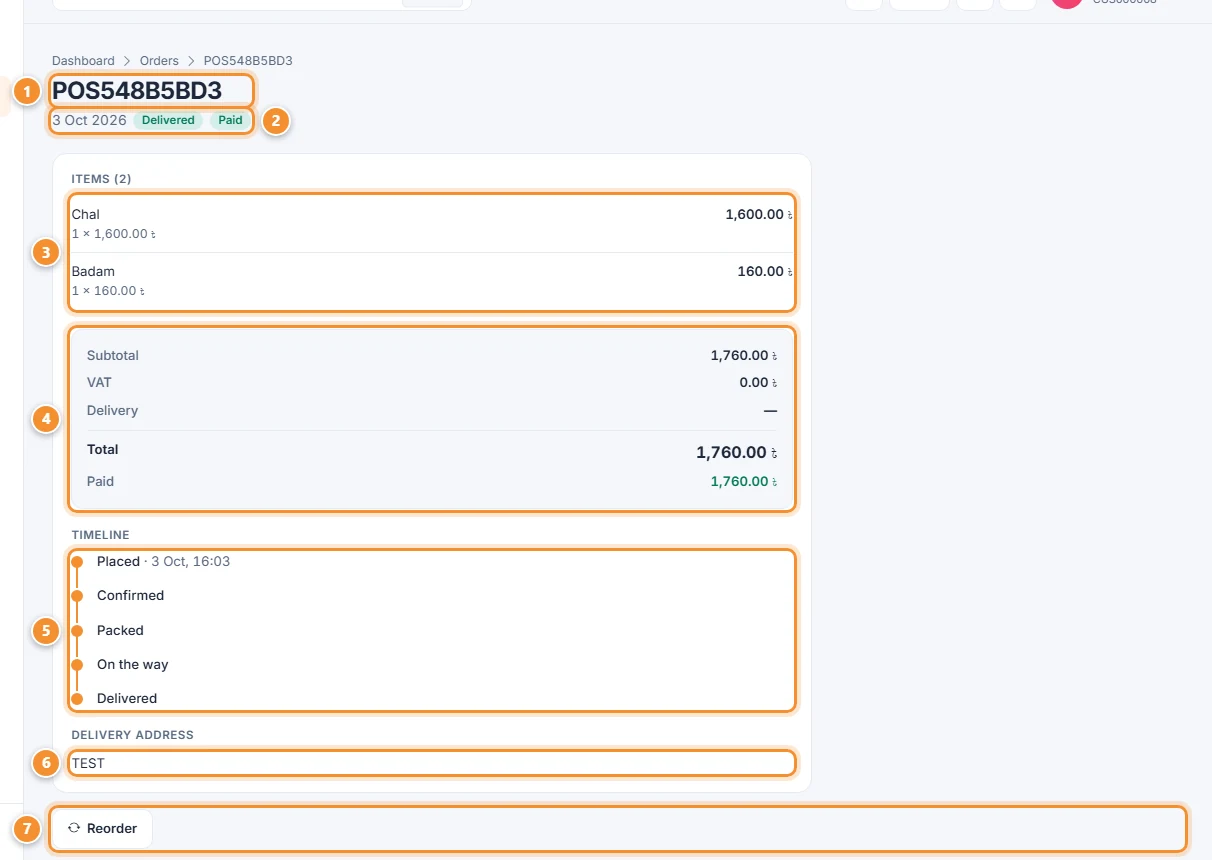 Customer order details with line items financial summary and timeline
- Order code heading — sales order identification code.
- Order metadata badges — submission timestamp and delivery/payment status badges.
- Itemized order lines — list of purchased products with quantities and line extensions.
- Order financial statement — subtotal, VAT, shipping charge, total invoice amount, paid sum, and balance due.
- Fulfillment delivery timeline — sequential progress tracking from order placed to final delivery.
- Shipping destination address — recipient name and delivery location details.
- Order action shortcuts — buttons to download tax invoice, pay outstanding balance, or reorder products.
Step-by-step: Reviewing order details and documents
- From Customer orders list, click on any order code button.
- In Order code heading (1) and Order metadata badges (2), verify the order number and current fulfillment and payment states.
- Inspect the individual product rows in Itemized order lines (3) to review purchased items, unit quantities, and line totals.
- Review the monetary breakdown in Order financial statement (4) including subtotal, applicable discounts, value-added tax, and shipping fees.
- Check Fulfillment delivery timeline (5) to see completed milestones, such as warehouse packing, courier handover, and expected delivery date.
- Confirm the destination location in Shipping destination address (6).
- In Order action shortcuts (7), click Download Invoice to save a PDF or print a hard copy.
- If the order has an unpaid amount, click Pay Balance to settle via your preferred payment gateway.
Every field and control
Order header and lines
- Order code heading (1): The unique sales identifier assigned to the commercial transaction.
- Order metadata badges (2): Placement calendar date and color-coded badges indicating payment status (Paid, Partial, Unpaid) and delivery state (Pending, Processing, Shipped, Delivered).
- Line items (3): Itemized list displaying each product title, ordered unit quantity, individual unit rate, and total line price.
Financial summary and tracking
- Financial summary (4): Mathematical breakdown presenting gross Subtotal, promotional Discount, calculated VAT, courier fees, invoice Total, cumulative Paid amount, and net Balance Due.
- Order timeline (5): Chronological status stepper marking milestones from order submission to warehouse dispatch and doorstep delivery with timestamps.
- Delivery address (6): Recipient individual or business legal name, delivery street address, postal code, and contact notes.
Order actions
- Download Invoice (7): Generates a printable, branded sales invoice document.
- Pay Balance (7): Available when an invoice has a remaining balance; opens the payment gateway selector to settle the invoice.
- Reorder (7): Available on settled orders; loads the exact products and quantities into your Shopping cart.
Common questions
How often is the delivery timeline updated?
The delivery timeline updates immediately as warehouse staff pack items, courier services scan tracking barcodes, or delivery drivers confirm handovers.
Can I print an invoice for an unpaid order?
Yes. The tax invoice is generated upon order placement and reflects the current paid and outstanding due amounts.