
Brand list
Browse, search, filter, and manage manufacturer brands and product labels across your catalog.
Brand list
Use this screen to view and organize every manufacturer brand, product label, and vendor make represented across your business inventory. Grouping items by brand enables instant brand-filtered product searches, brand sales reporting, and dedicated brand showcase pages on your online web storefront.
Brand means the commercial name or trademark under which products are manufactured or marketed, such as Samsung, Apple, or Unilever.
When you use this
- You introduce products from a new supplier or manufacturer and need to register their brand name first.
- You want to review all registered brands and verify their active sales status.
- You need to search for a specific brand to update its official logo or promotional description.
- You export your brand directory to an Excel spreadsheet for brand marketing analysis.
Before you start
- You need access to this screen. If you do not see it, ask your administrator.
- Keep the official brand name and manufacturer details ready.
Open the brand list
Click the Brand menu item on the Product application sidebar or desktop dock. The brand list table opens.
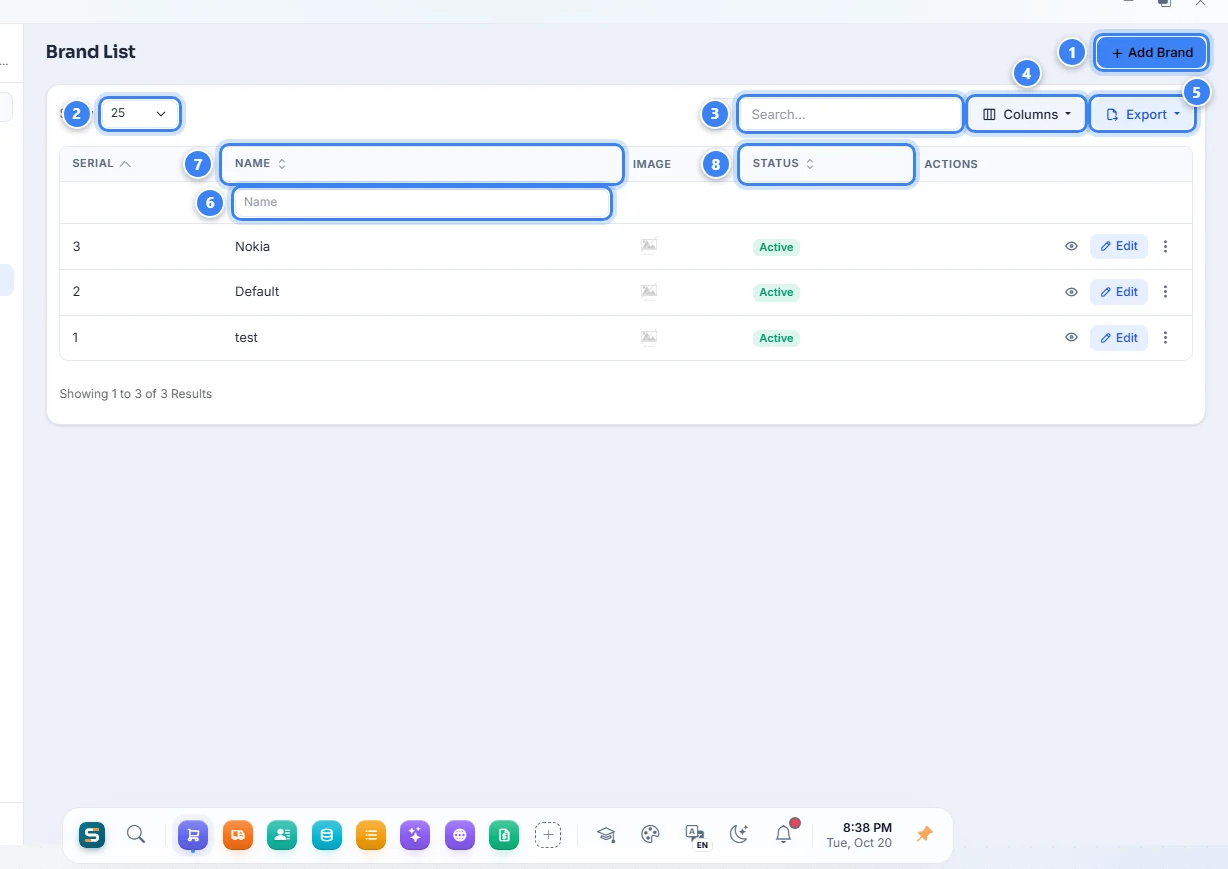 The brand list
- Add Brand — opens the modal window to register a new brand.
- Rows per page — selects how many brand rows to display per page (10, 25, 50, 100, or 250).
- Search — filters brands in real time as you type any part of a brand name.
- Columns — opens the column selector to toggle table column visibility.
- Export — downloads the visible brand records to an Excel or PDF document.
- Name filter — inline column filter to narrow brands by specific name text.
- Name column — displays the official brand title.
- Status column — shows whether a brand is currently Active or Inactive.
Every field on the brand list
| Control | What it is for | Example | Required? | Default | What happens when changed | What depends on it |
|---|---|---|---|---|---|---|
| Add Brand | Button to open the brand registration modal window. | Click button | Optional | — | Opens the Add Brand modal. | Allows creating new brands. |
| Rows per page | Dropdown controlling visible table rows. | 25 |
Optional | 10 |
Changes table page length. | Adjusts pagination numbers. |
| Search | Global search across brand names. | Apple |
Optional | Blank | Filters table rows matching query. | Narrows visible brands. |
| Columns | Menu to toggle visibility of table columns. | Toggle checkbox | Optional | All visible | Shows or hides selected columns. | Customizes table view. |
| Export | Downloads brand directory into files. | Click button | Optional | — | Generates Excel or PDF download. | Brand directory reporting. |
| Name filter | Inline column filter for brand name. | Samsung |
Optional | Blank | Filters table rows by name substring. | Inline column filtering. |
| Name column | Table column displaying official brand title. | Samsung |
Display | — | Clicking sorts table alphabetically. | Sort display order. |
| Status column | Table column displaying active or inactive state. | Active |
Display | — | Shows green or grey status badge. | Brand filter visibility on POS. |
Example
Nasir manages an electronics shop:
- He opens Brand list from his Sylloo desktop.
- He types
Sonyin the Search box. - The table immediately narrows down to show Sony along with its active status badge.
- He clicks Export to save an Excel summary of all registered brands for his inventory review.
Common questions
What happens if I deactivate a brand? Setting a brand to Inactive hides it from the brand dropdown selector on the product creation modal and POS search filters. Existing products that were previously assigned to this brand remain intact.
Can I delete a brand that has products attached? If a brand is currently assigned to existing products in your catalog, Sylloo protects data integrity by requiring you to reassign those products before removing the brand.
Can I upload brand logos? Yes. When adding or editing a brand, use the Upload tab in the modal window to attach high-resolution brand logos for web store display.