
Client portal registration
Self-register for a customer account to browse catalog pricing, submit purchasing orders, and view account statements.
Client portal registration
Use the Client portal registration screen to open a self-service customer account. Registered buyers can place online orders, save delivery addresses, inspect transaction ledgers, and pay outstanding balances through the secure portal.
When you use this
- Open a customer portal account with your supplier or retail merchant.
- Provide contact phone and email details for automated order dispatch notifications.
- Establish a secure passphrase for ongoing customer portal sign-ins.
- Accept terms of service before accessing commercial catalog rates.
Screen layout
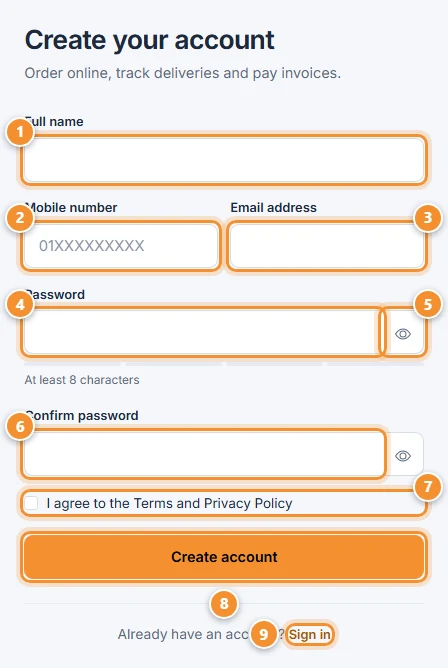 Client portal customer registration form
- Full name — customer primary individual or business contact name.
- Mobile number — primary telephone contact for order SMS notifications.
- Email address — customer email for portal sign-in and invoice delivery.
- Password — secure passphrase for client portal account.
- Toggle password visibility — shows or hides entered password characters.
- Confirm password — verification entry matching the chosen password.
- Terms agreement checkbox — confirms customer consent to store terms of service.
- Create account button — submits registration and creates customer record.
- Sign in link — navigates back to the portal login screen.
Step-by-step: Creating a new customer account
- Open your browser and navigate to the customer registration address (
/client/register). - In Full name (1), enter your legal name or the registered title of your business entity.
- Enter your valid mobile telephone number in Mobile number (2).
- In Email address (3), provide your primary email to receive order receipts and invoices.
- In Password (4), specify a strong passphrase. Observe the strength meter to ensure high security.
- Re-type the exact passphrase in Confirm password (6).
- Check the Terms agreement checkbox (7) to accept the commercial terms and privacy policy.
- Click the Create account button (8). Once registered, a confirmation badge displays and you can proceed directly to sign in.
Every field and control
Registration fields
- Full name (1): Primary customer name that prints on sales invoices, shipping labels, and payment receipts.
- Mobile number (2): Direct mobile phone number used for parcel delivery dispatch updates and optional two-factor verification.
- Email address (3): Account username and correspondence inbox for digital invoice copies and statement downloads.
- Password (4): Secret account security code. The dynamic meter evaluates passphrase length, numbers, and symbols across weak, fair, good, and strong levels.
- Toggle password visibility (5): Eye button that temporarily exposes entered characters so you can catch typos.
- Confirm password (6): Matching confirmation field preventing unintended password mistypes.
- Terms agreement checkbox (7): Mandatory compliance checkbox confirming agreement to business terms and conditions.
- Create account button (8): Submits the registration form, creates your customer contact profile, and enables portal access.
- Sign in link (9): Direct link back to the sign-in screen if you already have an active account.
Common questions
Does customer registration automatically create a record in Contacts?
Yes. When a new customer completes self-registration, the system automatically registers a new record in Contacts with portal access enabled.
Can customers sign in immediately after registering?
Yes. Unless your merchant enforces manual business approval, you can sign in immediately at Client portal sign-in using your newly registered mobile number or email.
What should I do if the system says my email or mobile is already in use?
If your contact details were previously registered by your supplier, your account already exists. Click Sign in (9) and select Forgot password to retrieve your access credentials.
Related pages
- Client portal sign-in — sign in to your registered customer account.
- Forgot portal password — recover your password if you already registered.
- Contacts and accounts — how merchants inspect self-registered customer accounts.