
Forgot portal password
Request a secure password reset link sent to your registered email address to restore customer portal access.
Forgot portal password
Use the Forgot portal password screen to request an automated account recovery email. If you misplace or forget your portal sign-in credentials, submitting your verified customer email dispatches a time-sensitive link to establish a new password.
When you use this
- Recover access to your customer portal when your current password is forgotten.
- Request a password reset link after an account login lock expires.
- Navigate back to the sign-in screen if you remember your credentials.
Screen layout
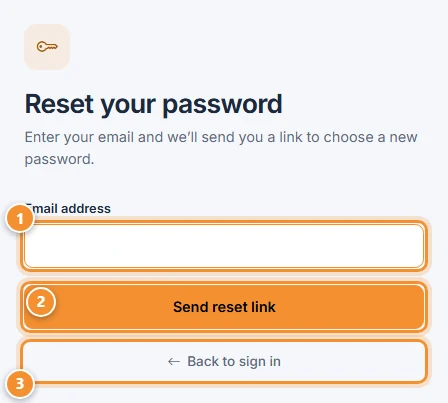 Forgot portal password recovery screen
- Email address — registered customer email address to receive password reset link.
- Send reset link button — dispatches password recovery instructions to the customer inbox.
- Back to sign in link — returns to the client portal login screen.
Step-by-step: Requesting a password recovery link
- On the Client portal sign-in screen, click Forgot password?.
- In the Email address (1) field, enter the email address tied to your customer profile.
- Click the Send reset link button (2).
- Check your email inbox for an automated message containing your secure recovery link.
- Follow the link in the email to open Reset portal password and establish your new passphrase.
Every field and control
Recovery fields and actions
- Email address (1): Registered correspondence email associated with your customer contact record.
- Send reset link button (2): Triggers the automated email dispatch service with a secure, single-use token.
- Back to sign in link (3): Navigates directly back to the customer login screen without requesting a reset link.
Common questions
How long is the password reset link valid?
Password reset links remain valid for 60 minutes from the moment of dispatch. If your link expires before you complete the reset process, return to this screen to request a fresh token.
What should I do if I do not receive the recovery email?
First, check your spam or junk folder. If the email has not arrived within a few minutes, verify that you entered the exact email registered on your account, or contact your supplier's team to confirm your customer email address in Contacts.
Related pages
- Client portal sign-in — sign in with your updated password.
- Reset portal password — complete the password change process.
- Client profile — update your password and contact details once logged in.