
Account Receipt Setting Edit
Create or modify account receipt types, money collections, and ledger transfer vouchers.
Account Receipt Setting Edit
The Account Receipt Setting Edit window lets you configure financial receipt vouchers and customer collection entries. You can also configure double-entry journal vouchers, fund transfers, and party debit or credit notes.
Account receipt types control how you categorize payments, fund transfers, and balance adjustments across ledgers and counterparties.
When you use this
- Setting up single-entry collection or payment vouchers for cashiers and bookkeepers.
- Configuring double-entry journal vouchers for adjustments, accruals, and closing entries.
- Creating internal fund transfer routes between bank accounts and cash counters.
- Setting up party notes such as credit notes, debit notes, write-offs, or refunds.
Every field: Single Entry form type
The Single Entry form type creates single-entry vouchers. You select one cash or bank account in the header and enter itemized lines in a table. The system generates matching debit and credit postings automatically. Use this form type for income, customer collections, business expenses, and vendor payments.
Configuring this form type gives members access to the Voucher list and the Add or edit voucher modal window.
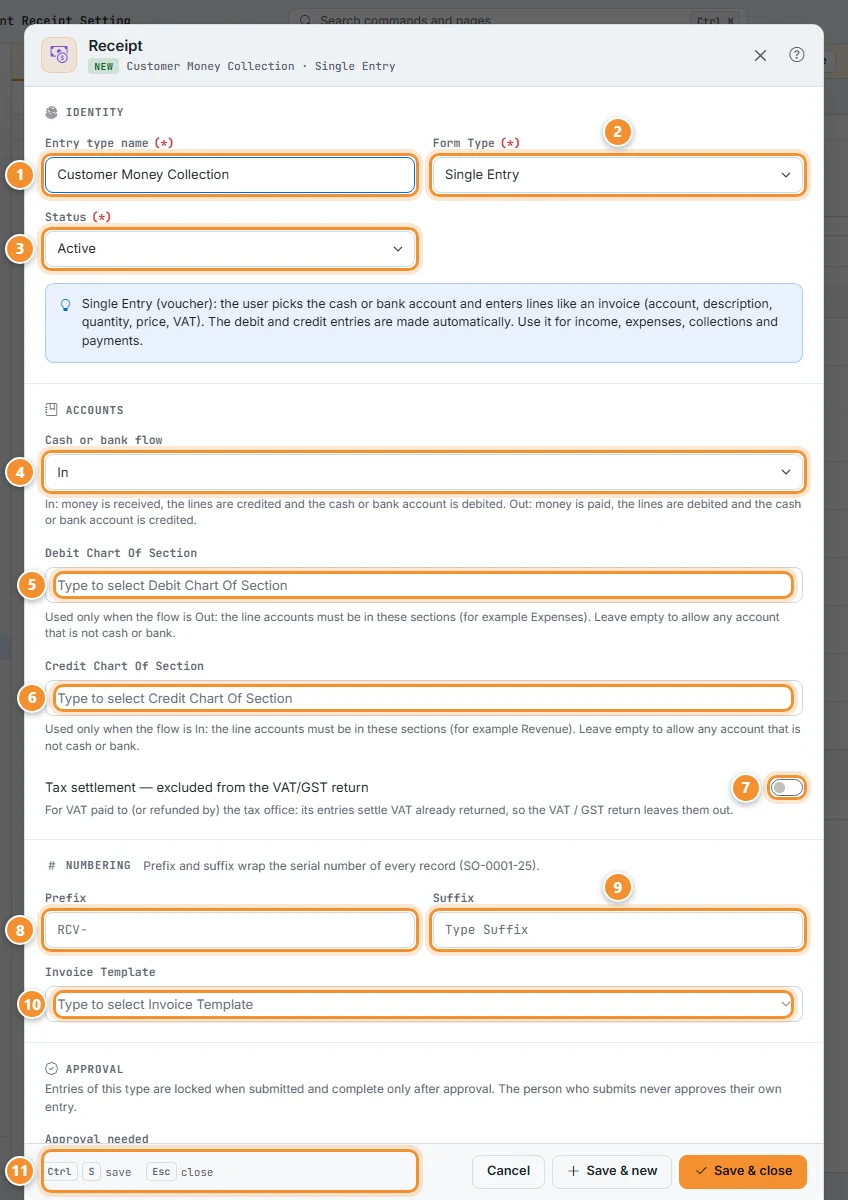 Single Entry receipt type
- Entry type name — Display name shown on receipt vouchers and navigation menus.
- Form Type — Single Entry voucher format with automated debit and credit postings.
- Status — Operational status enabling or disabling this voucher type.
- Cash or bank flow — Flow direction setting: Receive for incoming money or Payment for outgoing money.
- Debit Chart Of Section — Permitted debit account sections for offset ledger selections.
- Credit Chart Of Section — Permitted credit account sections for offset ledger selections.
- Tax settlement — excluded from the VAT/GST return — Toggles tax clearance treatment to exclude entries from statutory tax returns.
- Prefix — Code prefix attached to sequential voucher numbering.
- Suffix — Optional trailing code attached to voucher numbering.
- Invoice Template — Printable layout used when rendering voucher receipts.
- Approval needed — Authorization rule requiring managerial review before posting.
- Approvers — Authorized user accounts entitled to sign off submitted vouchers.
Every field: Double Entry form type
The Double Entry form type creates journal entry vouchers where you enter both debit and credit lines manually. Both sides must balance before you can save the entry. Use this form type for general journals, asset depreciation, accruals, ledger corrections, and year-end closing entries.
Configuring this form type gives members access to the Journal entry list and the Add or edit journal entry modal window.
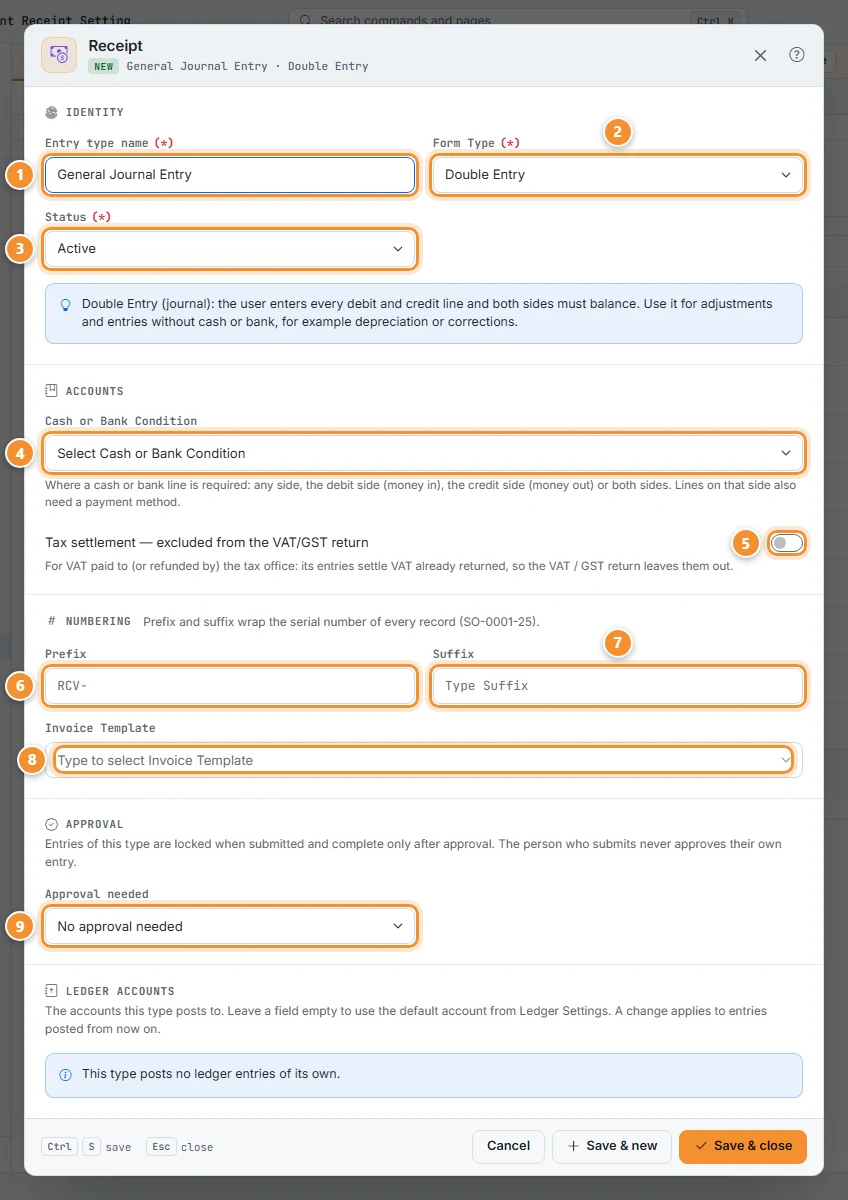 Double Entry receipt type
- Entry type name — Display name shown on journal entry screens and menus.
- Form Type — Double Entry format requiring balanced debit and credit line inputs.
- Status — Operational status enabling or disabling this journal entry type.
- Cash or Bank Condition — Enforces whether cash or bank ledger rows are required on any side, debit, credit, or both sides.
- Tax settlement — excluded from the VAT/GST return — Excludes tax settlement journal entries from statutory VAT returns.
- Prefix — Sequential numbering prefix such as JRN-.
- Suffix — Optional numbering suffix.
- Invoice Template — Printable journal voucher template.
- Approval needed — Specifies whether journal vouchers post immediately or require approval.
Cash or bank condition rules
This setting enforces cash and bank validation rules on double-entry journal vouchers:
- Any side — No restrictions. You can save the journal entry without any cash or bank ledger account.
- Debit side — Requires at least one cash or bank account on the debit side (money in). That line must include a payment method.
- Credit side — Requires at least one cash or bank account on the credit side (money out). That line must include a payment method.
- Both sides — Requires at least one cash or bank account on each side. You must assign payment methods to both lines.
If a user attempts to save a journal entry that violates the configured condition, the system refuses the entry and displays a validation message.
Every field: Transfer form type
The Transfer form type creates contra vouchers that move funds directly between two of your business cash or bank accounts. Transfers do not involve third parties, revenue accounts, or expense accounts.
Configuring this form type gives members access to the Transfer list and the Add or edit transfer modal window.
Because fund transfers operate strictly between internal cash and bank accounts, you do not configure offset ledger sections here. Members select both the source account and destination account directly on the entry screen.
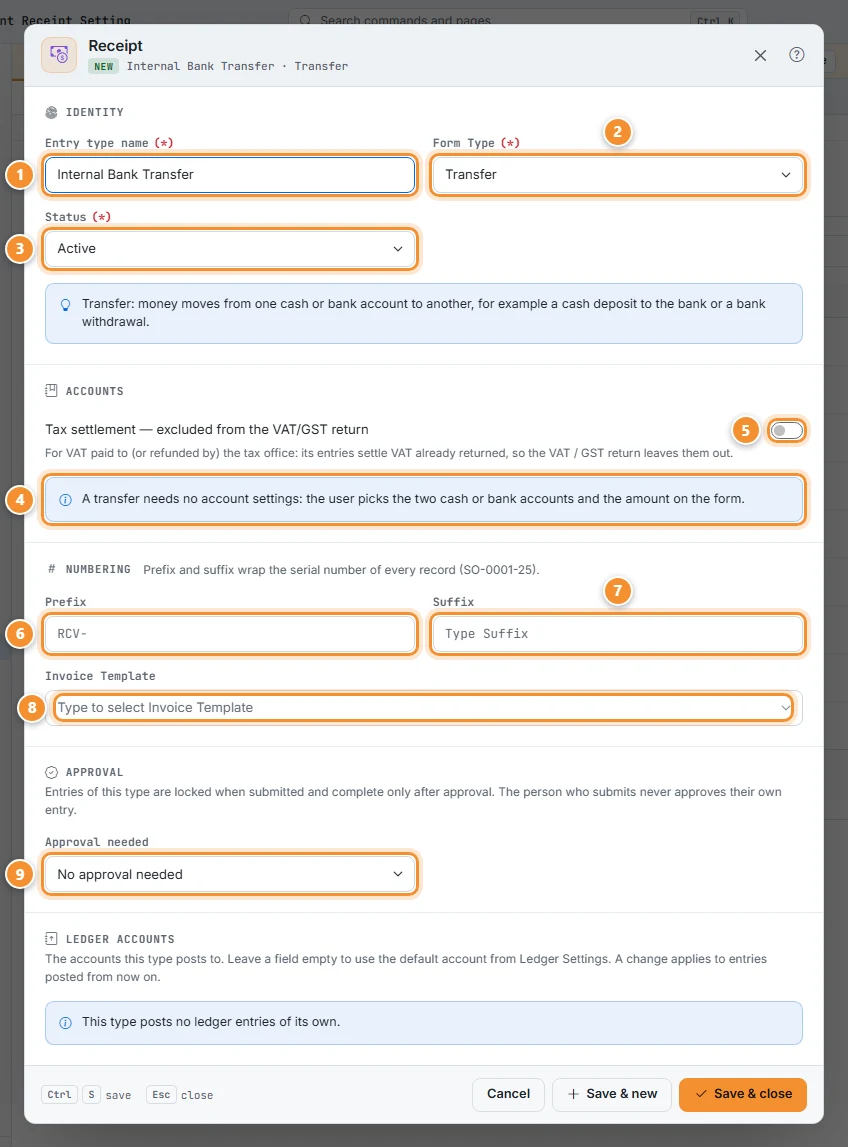 Transfer receipt type
- Entry type name — Display title shown on contra transfer screens.
- Form Type — Transfer format for moving funds between two business cash or bank accounts.
- Status — Operational status of this transfer type.
- Transfer settings notice — Indicates that account selection occurs directly on the member entry screen.
- Tax settlement — excluded from the VAT/GST return — Indicates tax clearance status if transferring funds directly for tax liabilities.
- Prefix — Numbering prefix for transfer vouchers (e.g. TR-).
- Suffix — Optional numbering suffix.
- Invoice Template — Printable transfer slip template.
- Approval needed — Authorization requirement for fund transfers.
Every field: Party Note form type
The Party Note form type creates credit notes, debit notes, write-offs, or refunds linked to customers or suppliers. Party notes adjust counterparty balances and settle outstanding invoices or purchase bills.
Configuring this form type gives members access to the Party note list and the Add or edit party note modal window.
When configuring a party note type, you define two specialized options:
- Note kind — Specifies the business role: Credit Note, Debit Note, Write-off, or Refund.
- For — Specifies the target counterparty side: Customers (lowers receivables) or Suppliers (lowers payables).
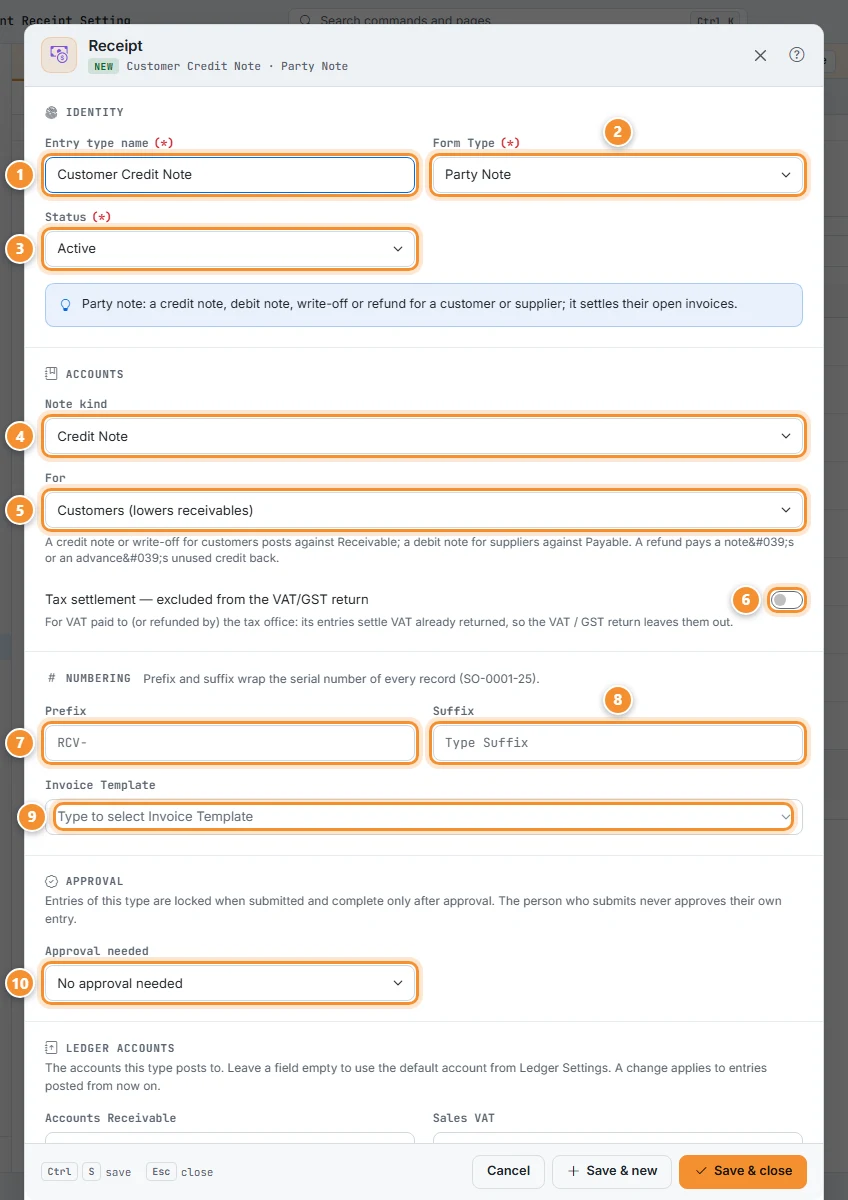 Party Note receipt type
- Entry type name — Display title shown on party adjustment screens.
- Form Type — Party Note format for counterparty credit, debit, write-off, or refund adjustments.
- Status — Operational status of this party note type.
- Note kind — Adjustment role: Credit Note, Debit Note, Write-off, or Refund.
- For — Target counterparty side: Customers (lowers receivables) or Suppliers (lowers payables).
- Tax settlement — excluded from the VAT/GST return — Toggles tax settlement status for party balance adjustments.
- Prefix — Sequential numbering prefix (e.g. CN- or DN-).
- Suffix — Optional numbering suffix.
- Invoice Template — Printable credit or debit note slip template.
- Approval needed — Authorization requirement before party adjustments post to customer or supplier balances.
Common questions
What is the difference between Single Entry and Double Entry receipt forms?
Single Entry asks users for a single cash or bank account with offset lines. Double Entry provides complete multi-line debit and credit journal vouchers.
Can I require manager approval on fund transfers?
Yes. Set Approval needed to Any one approver or All approvers to require manager sign-off prior to balance posting.
How does tax settlement affect the VAT return?
When you enable the tax settlement option, the system excludes entries from standard VAT returns because they clear liabilities already reported.
Related pages
- Account Receipt Setting — List and overview of all configured account receipt types.
- Payment Setting — Configuration options for incoming and outgoing payment methods.
- Voucher list — User guide for single-entry collection and payment vouchers.
- Journal entry list — User guide for double-entry journal vouchers.
- Transfer list — User guide for contra cash and bank fund transfers.
- Party note list — User guide for credit notes, debit notes, and refunds.