
Ledger Maintenance
Audit trial balance integrity, repair broken account summaries, and recalculate ledger balances.
Ledger Maintenance
Ledger Maintenance enables developers to audit accounting book balances, check trial balance equality, repair damaged summary totals, and recalculate balances from posted journal vouchers.
Maintenance actions recompute cached summary figures directly from historical journal entries, ensuring accurate financial reporting.
When you use this
- Investigating trial balance discrepancies by running a read-only integrity audit.
- Rebuilding account balances after importing large volumes of opening journal entries.
- Repairing broken account summary figures following system maintenance.
- Verifying debit and credit equality across all fiscal periods.
Before you start
- Sign in to the Developer Console with your developer credentials and two-factor code.
- Ensure all ongoing cashier shifts or batch posting jobs are paused.
- Run maintenance audits in Practice mode before performing balance recomputations on live accounts.
Open the ledger maintenance screen
In the Developer Console left navigation explorer, under the Account section, click Ledger Maintenance.
Run a read-only audit
Click Check books to inspect trial balance equality and review the summary report.
Repair summaries or recalculate balances
If discrepancies are detected, click Check and fix summaries to reconcile broken totals, or click Recalculate balances to rebuild figures from posted vouchers.
Every field on this screen
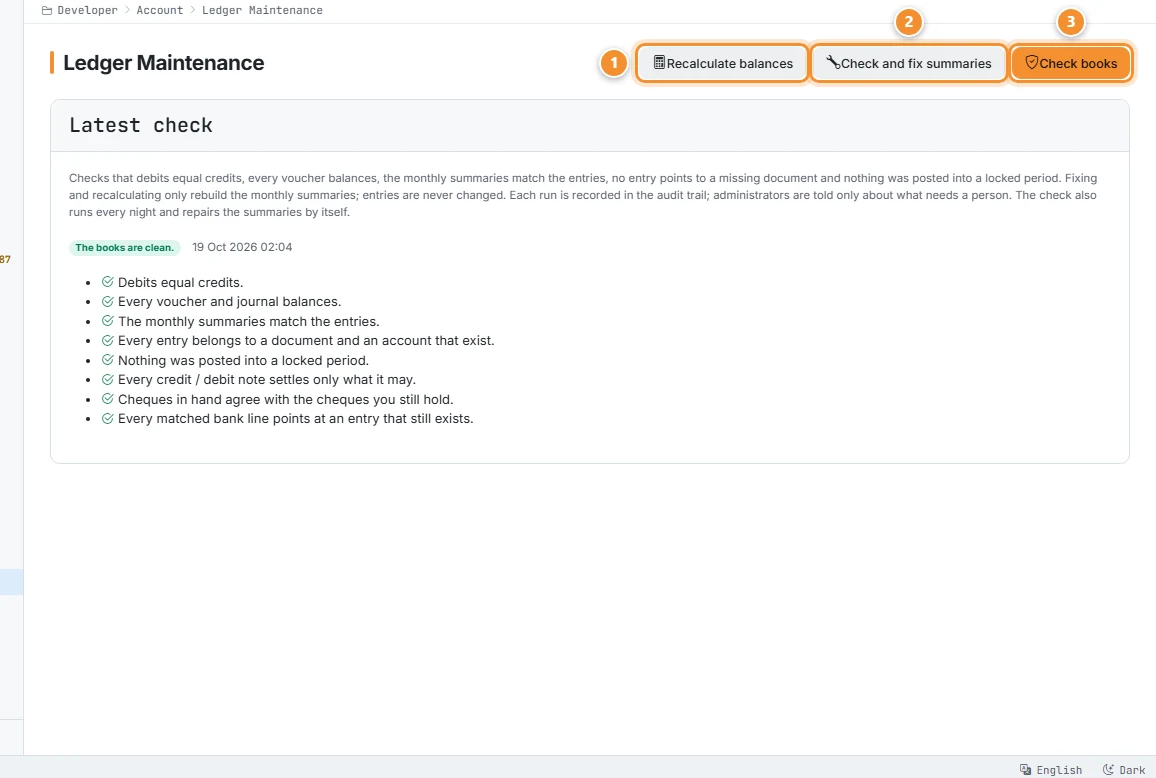 Ledger books integrity checking and balance recalculation
- Recalculate balances — recomputes account balances from posted vouchers and journal entries.
- Check and fix summaries — scans accounting ledger books for inconsistencies and repairs broken totals.
- Check books — performs a read-only integrity audit across trial balances, vouchers, and accounts.
Complete example: Auditing year-end financial ledgers
Suppose a financial controller notices an imbalance in the trial balance report:
- In Developer Console, navigate to Account › Ledger Maintenance.
- Click Check books to start a non-destructive audit.
- The system scans all posted journal vouchers and flags any accounts where summary totals deviate from voucher line sums.
- If flagged, click Check and fix summaries to recalculate cached totals and restore trial balance balance.
How to extend
- Review system default posting tags in Ledger Setting.
- Trace transaction posting pathways using Order Setting.
- Examine collection vouchers in Account Receipt Setting.
Rules and pitfalls
- Balance recalculation requires temporary processing locks; run during off-peak hours.
- Recalculating balances never alters or deletes existing posted vouchers.
- Always check that fiscal periods are closed properly before running annual summary repairs.
Common questions
Does recalculating balances alter existing vouchers? No. It recomputes cached summary totals and opening balances from existing posted journal vouchers without changing voucher details.
How often should Check books be executed? Running Check books monthly or prior to closing financial periods ensures early detection of reporting discrepancies.