
Delivery Setting Edit
Create or modify delivery types, challan numbering formats, and custom shipping schema attributes.
Delivery Setting Edit
The Delivery Setting Edit window enables developers to configure delivery types, dispatch vouchers, shipping challans, and custom shipping note schema attributes.
Each delivery type controls how shipping vouchers and delivery challans are formatted, numbered, authorized, and printed across inventory and order fulfillment operations.
When you use this
- Creating specialized fulfillment pathways such as
Courier Delivery,Customer Pickup, orExpress Freight Dispatch. - Configuring automated delivery challan prefix numbering (e.g.
DLV-orCHAL-). - Assigning default delivery note and packaging slip print layouts.
- Adding custom schema fields to capture shipping carrier details, tracking numbers, or vehicle registration numbers.
Before you start
- Open Delivery Setting and click Delivery Setting Add or click an existing record's edit button.
- Ensure prerequisite delivery note print templates are configured in Invoice Templates.
- Verify staff authorizations and roles for shipping and dispatch approvals.
Configure basic identity and numbering
On the Basic tab, enter the Title and unique technical Name. Select the operational Status (Active or Inactive), select a default Invoice Template for delivery notes, and define reference Prefix and Suffix strings.
Configure approval mode
Choose the required authorization policy under Approval needed (such as No approval needed for instant fulfillment, or Any one approver for manager sign-off).
Add custom schema attributes
Switch to the Additional Fields tab. Click Add field to define custom delivery note parameters (such as delivery tracking numbers or carrier names).
Save the delivery type
Click Save & close at the bottom of the window to apply your changes and refresh the list.
Every field on this screen
Basic tab
The Basic tab holds primary delivery identity, numbering rules, print layout bindings, and authorization settings.
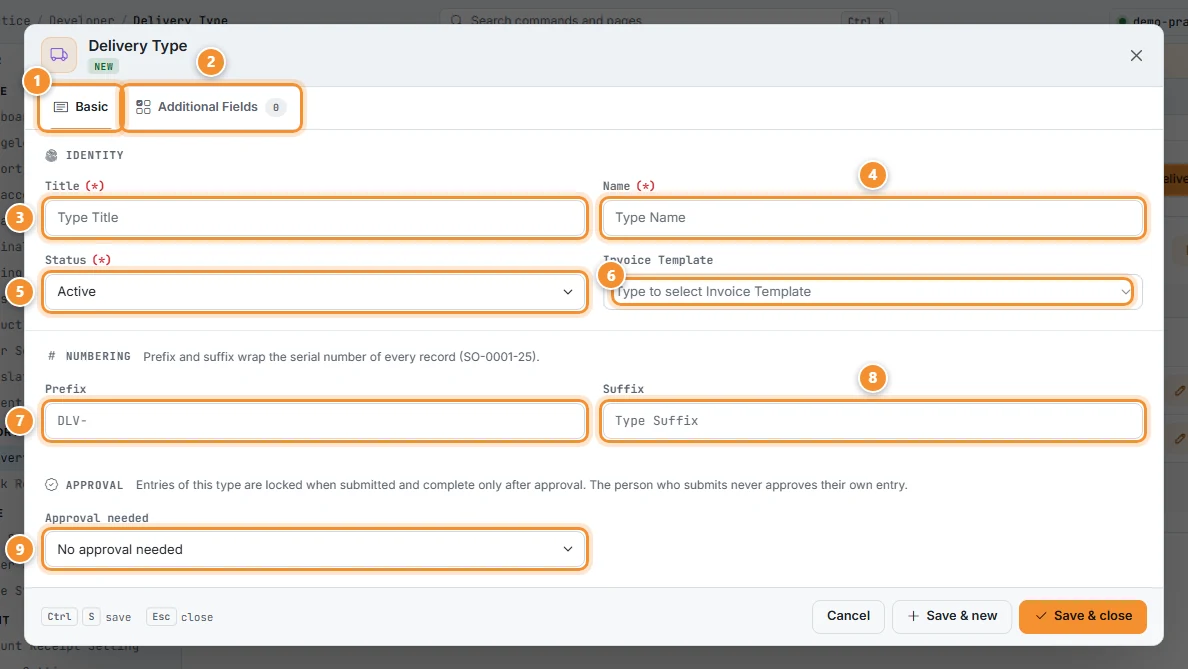 Adding or changing a delivery type — Basic tab
- Basic — core configuration tab containing identity, invoice template, numbering, and approval rules.
- Additional Fields — tab containing the visual schema field builder for custom delivery note parameters.
- Title — display name shown to dispatch staff in delivery dropdowns and order forms (e.g.
Courier Delivery). - Name — unique technical identifier used internally (e.g.
courier_delivery). - Status — sets whether this delivery type is active and selectable by staff, or disabled.
- Invoice Template — preset printable dispatch note, delivery challan, or packaging slip template.
- Prefix — characters placed at the beginning of generated delivery challan numbers (e.g.
DLV-). - Suffix — characters placed at the end of generated delivery challan numbers.
- Approval needed — dropdown selecting authorization requirements (
No approval needed,Any one approver, orAll approvers).
Additional Fields tab
The Additional Fields tab allows attaching custom schema parameters to delivery challans.
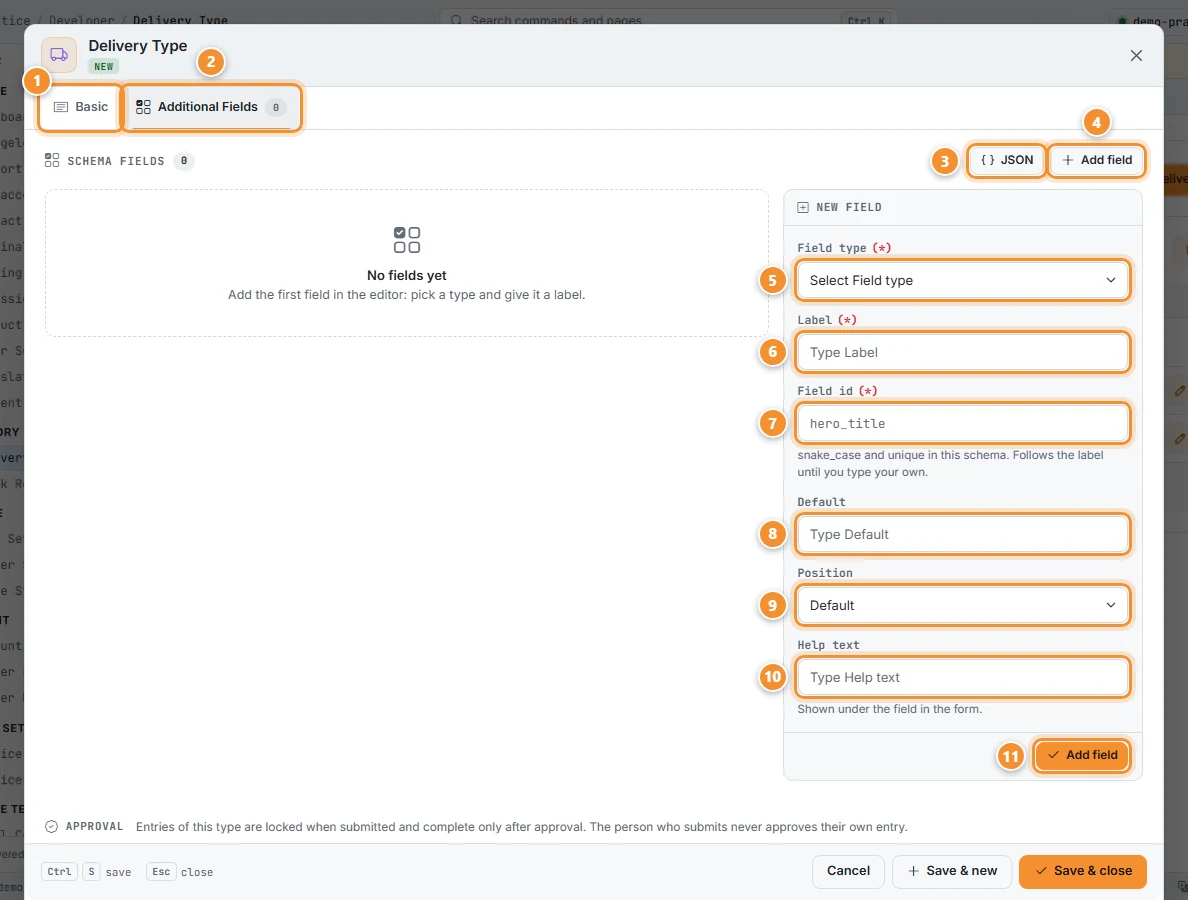 Adding or changing a delivery type — Additional Fields schema builder
- Basic — switch back to core delivery identity and numbering settings.
- Additional Fields — active tab for adding and configuring custom delivery voucher attributes.
- JSON — toggle view displaying the generated JSON schema definition.
- Add field — button opening the attribute editor card.
- Field type — dropdown selecting the input control type (Text, Select, Checkbox, Image Upload, Category, etc.).
- Label — user-facing field label rendered on delivery forms (e.g.
Carrier Tracking Number). - Identifier — unique snake_case schema key stored in JSON and accessed in print templates (e.g.
carrier_tracking_number). - Default — optional preset initial value automatically populated on new delivery records.
- Position — form section where this field appears (e.g.
Basic). - Help text — explanatory guidance displayed beneath the input control on member forms.
- Save field — button committing this custom attribute into the delivery type schema.
Complete example: Configuring a "Courier Delivery" channel
Suppose you need to set up a courier shipping method that collects carrier names and consignment numbers:
- In Delivery Setting, click Delivery Setting Add.
- On the Basic tab:
- Set Title to
Courier Delivery. - Set Name to
courier_delivery. - Set Status to
Active. - Set Prefix to
DLV-. - Set Approval needed to
No approval needed.
- Set Title to
- Switch to the Additional Fields tab:
- Click Add field.
- Select Field type
Text. - Set Label to
Carrier Tracking Number. - Set Identifier to
carrier_tracking_number. - Click Save field.
- Click Save & close.
When warehouse operators fulfill orders using Courier Delivery, the delivery challan prompts for the carrier tracking number and generates reference numbers like DLV-00101.
How to extend
- Access custom delivery attributes in custom printed templates using their identifiers.
- Add multi-tier management sign-offs by setting Approval needed to
All approvers. - Pair with Order Setting to route specific order channels to dedicated shipping workflows.
Rules and pitfalls
- The technical Name must be unique and contain only lowercase alphanumeric characters and underscores.
- Field identifiers in Additional Fields must be unique snake_case strings.
- Disabling a delivery type prevents staff from choosing it for new dispatches but preserves historical challans.
Common questions
Can custom delivery fields be printed on customer packing slips? Yes. Any schema attribute defined here can be included in the corresponding print template.
What happens if approval needed is enabled? The delivery challan remains in a pending approval status until authorized by the designated approvers.