
Stock Receipt Setting Edit
Create or modify inventory transaction types, goods received notes, and stock transfer rules.
Stock Receipt Setting Edit
The Stock Receipt Setting Edit window enables developers to configure inventory transaction types, goods received notes (GRN), warehouse-to-warehouse stock transfers, and inventory damage write-offs.
Stock receipt types govern warehouse inventory adjustments, multi-branch stock transfers, and automated inventory valuation updates.
When you use this
- Creating specialized inventory movement vouchers such as
Inward Warehouse ReceiptorSupplier Consignment Intake. - Configuring inter-branch inventory transfer workflows between central warehouses and retail outlet stores.
- Setting up damaged, expired, or defective inventory write-off pathways.
- Defining automated document prefix numbering (e.g.
SR-,TRF-, orDMG-).
Before you start
- Open Stock Receipt Setting and click Stock Receipt Setting Add or click an existing record's edit button.
- Ensure prerequisite warehouse locations and outlets exist in the Inventory module.
- Verify goods receipt and stock transfer print layouts in Invoice Templates.
Configure identity and movement classification
Enter the Title and unique technical Name. Select the inventory movement Type (Stock In/Out, Stock Transfer, or Stock Damage). Select the operational Status (Active or Inactive), and assign a default Invoice Template.
Configure numbering prefix and suffix
In the numbering section, enter the reference Prefix (e.g. SR- or TRF-) and optional Suffix strings.
Configure approval mode
Under Approval needed, select the required authorization policy (such as No approval needed for instant stock adjustments, or Any one approver for manager sign-off).
Save the stock receipt type
Click Save & close at the bottom of the window to apply your changes and refresh the list.
Every field on this screen
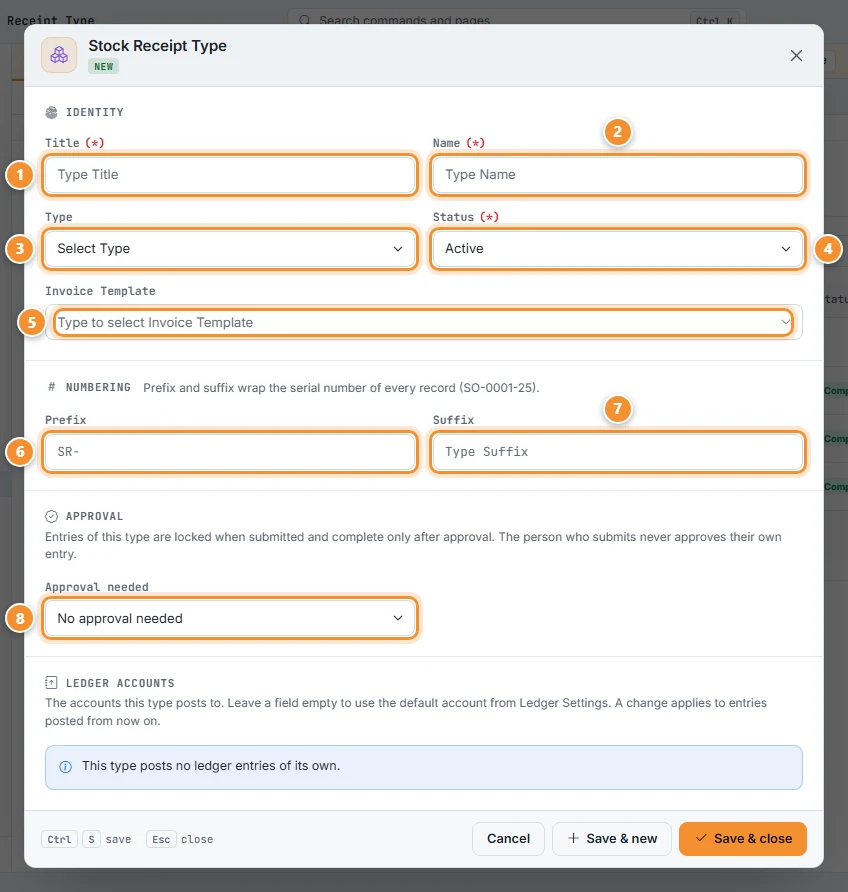 Adding or changing a stock receipt type
- Title — display name shown to warehouse staff in inventory receipt and transfer menus (e.g.
Warehouse Inward Receipt). - Name — unique technical identifier used internally (e.g.
warehouse_inward_receipt). - Type — classifies the movement pathway (
Stock In/Out,Stock Transfer, orStock Damage). - Status — sets whether this stock receipt type is active and selectable by staff, or disabled.
- Invoice Template — preset printable layout used for goods received notes or stock transfer slips.
- Prefix — characters placed at the beginning of generated voucher numbers (e.g.
SR-). - Suffix — characters placed at the end of generated voucher numbers.
- Approval needed — dropdown selecting authorization requirements (
No approval needed,Any one approver, orAll approvers).
Complete example: Defining an "Inter-Branch Transfer" voucher
Suppose you need to configure a stock transfer voucher between retail outlets that requires manager approval:
- In Stock Receipt Setting, click Stock Receipt Setting Add.
- In the modal:
- Set Title to
Inter-Branch Stock Transfer. - Set Name to
branch_transfer. - Set Type to
Stock Transfer. - Set Status to
Active. - Set Prefix to
TRF-. - Set Approval needed to
Any one approver.
- Set Title to
- Click Save & close.
When warehouse operators initiate a stock movement between branches, the system generates vouchers with numbers like TRF-00101 and holds the transaction in pending status until approved.
How to extend
- Customize printed goods received note layouts using the template editor.
- Connect stock movements to double-entry accounting ledgers for automated inventory revaluation.
- Pair with Delivery Setting to manage outward shipping challans.
Rules and pitfalls
- The technical Name must be unique and contain only lowercase alphanumeric characters and underscores.
- Movement Type determines the underlying stock ledger impact and cannot be changed once transactions are recorded.
- If Approval needed is enabled, designated approvers must authorize the voucher before stock quantities update.
Common questions
Can different stock movement types have different numbering prefixes?
Yes. You can assign unique prefixes like GRN- for intake and DMG- for write-offs.
Where do warehouse staff use these types? Staff select configured receipt types when creating goods received notes, branch transfers, or damage write-offs in the Inventory module.